
Solutions
Starfish File Management gives you a clear view of every file you own and the platform to act at any scale.
Starfish catalogs every file across every storage system you own, then archives, moves, protects, or deletes it at scale. Vendor-neutral, out of the data path, no lock-in.
Because files don't manage themselves.
Solutions answer "what problem does this solve?" Each one is built from use cases that answer "what can I do with it?"
Data Observability & Cost Control
See everything, fast, and find out what it’s costing you.
For: CIOs and infrastructure leaders, research computing, storage buyers, and FinOps.
Data Lifecycle Management
Manage data from creation to deletion, on policy, without a project.
For: Infrastructure and storage leaders, CIOs, CISOs, and research computing leadership.
Workflow Automation
Automate how data is detected, moved, tagged, and proved, including by the people who own it.
For: VPs of R&D IT, heads of scientific computing and HPC, core facility directors, and research data managers.
AI Data Readiness
Prepare governed, well-described data for AI and prove it was handled properly.
For: CDOs and VPs of R&D IT, data science leaders, with security and compliance as co-signers.
What we believe
You cannot manage a file estate when you can only guess what you have.
Most storage teams run environments they cannot describe. Not because they are careless, but because their tools answer questions about capacity when the questions that matter are about files.
A dashboard that cannot act is a report, and you already have reports. Discovery only matters if the thing that discovered a problem can also do something about it, at the same scale, in the same product with the same context.
And the answer to data growth is no longer “buy more disk”. It is the least imaginative answer available, it is the most expensive, and it no longer works in an era of hardware scarcity and accelerating cost.
How it works
Four components, one catalog.
Unstructured Data Catalog (UDC)
Stores file attributes, user-defined tags, and extracted metadata in a high-performance database designed to answer questions about file storage at massive scale.
Reporting, search, and automation all query the catalog, not the file system.
Starfish Automation Engine (AE)
Executes data management workflows: moving, copying, archiving, deleting, metadata extraction or enrichment, duplicate detection, or enacting policies. Extensible to third-party applications, AI models, external databases, and custom scripts in any language.
Because it queries the catalog, it never walks the tree, and it can act at the scale of the catalog.
Starfish Zones
Groups directory trees, volumes, and/or cloud buckets and assigns them to a set of users, creating a secure, self-service environment that does not require full system administrative rights.
The delete/keep decision moves to the person who can actually make it.
Starfish Remote Agents
Linux and Windows agents deploy in multiples to parallelize scanning and execution. Scan Enablers cover object stores; Scan Accelerators are native integrations for Lustre, GPFS, PowerScale (Isilon), Qumulo, HPSS, VAST, and WEKA.
Accelerators query the platform’s own catalog or changelog instead of crawling, which is why scan times are measured in seconds.
The Feedback loop
Query → Execute → Update → Repeat
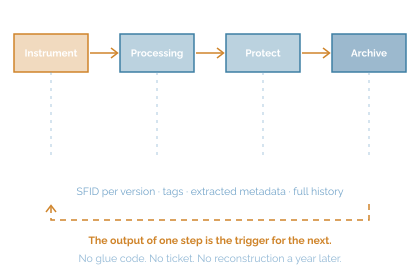
The output of a catalog query is the input to an automation process. The output of that process writes back to the catalog as key-value metadata describing what was done to the file, or what was discovered about it. Those key-value pairs then become part of the query that defines the next process. This is why workflows chain without glue code.
How we're different
Built from the beginning to handle the largest, most complex file estates.
Performance at Scale
Performance drives outcomes
Starfish's patented architecture runs scanning agents in parallel, and each agent can launch multiple threads to accelerate scanning. Changed-file lists come from the catalog and from changelog ingestion: GPFS policy engine, Lustre changelog, S3 notifications, Qumulo/Isilon/WEKA snapdiff, the VAST catalog, and the HPSS API, all avoiding ongoing tree walks.
Broad Capability
The Automation Engine is more than a data mover
Starfish supports a wide range of data automation actions like move, backup, archive, migrate, replicate, burst to cloud, delete, add tags, extract or append metadata, enact policies, implement data protection, or run any code against any file or directory, directly via script or 3rd party application integration.
Performance at Scale
Single-Platform
The tight integration between the UDC and the Automation Engine creates a feedback loop, where the output of a query is the input to a process, which writes back to the catalog as key-value metadata describing what was done.
User Engagement
Zones
Storage Zones map virtual collections of volumes and directories, then deliver visibility to data owners with delegated authority to actions. Users can tag, search, archive, and recover their own files with full IT guardrails in place.
Development Platform
Starfish has a broad set of APIs and MCPs
A REST API underneath everything, a suite of MCPs, a CLI, an SQL-queryable database, web-based dashboards, and hooks for Airflow, n8n, Nextflow, and Snakemake. Together they offer the foundation to build applications using file-based data in a governed, auditable way and without mounting the file system.
Install Base
Customers at the top tier of every industry
Starfish is installed in 8 of the world’s top 10 pharmaceutical companies, 7 of the 8 Ivy League universities, 2 of the top 5 global semiconductor manufacturers, more than 25 top tier US research universities, 4 US national labs, 3 largest HFT financial firms, and the number one supercomputer in the world.
Ready When You Are
Storage is not free, and pretending it is guarantees you will buy more.
Four to six weeks after a read-only scan, you have an aging, ownership, and ROT report. Nothing moves until you decide.