
Use Cases
Because files don't
manage themselves
When your data reaches billions of files and hundreds of petabytes, ordinary tools stop working. Starfish is built for the file storage use cases that matter most at that scale.
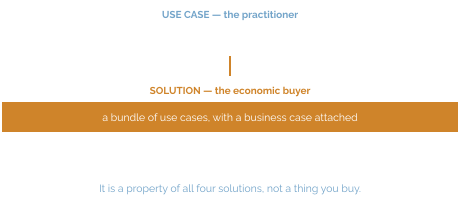
Built from these use cases
[Not in framework]
Storage Analytics
Turns weeks-long manual audits into on-demand reporting and gives IT a defensible basis for forecasts and budget requests.
Chargeback & Showback
Measure and report storage consumption and cost for users, projects, departments, or cost centers, either for visibility (showback) or to allocate costs back to budgets (chargeback).
Archive & Tiering
Automatically classify unstructured data by age, activity, and value, then move inactive or lower-value data off primary storage to more cost-effective tiers.
Capacity Reclamation & ROT Reduction
Redundant, obsolete, and trivial (ROT) data accumulates because nobody has a fast, safe way to find it, prove it is unused, and get authorization to remove it.
Data Movement & Migration
Platform refreshes, cloud adoption, consolidations, and M&A integrations routinely overrun because legacy copy tools cannot move billions of files fast enough.
Data Protection
Traditional backup relies on slow, metadata-heavy tree walks to determine what changed, which cannot complete inside a window once an environment reaches billions of files.
Scientific Workflows
Research environments generate data continuously from instruments, sensors, and pipelines, but it lands in ad hoc locations with no consistent naming, tagging, or lineage.
Data Classification & Metadata Management
Most files carry only basic filesystem metadata (name, size, timestamps) with no reliable way to know what is inside them, who should own them, or how sensitive they are.
User-Driven Data Management
Centralizing every data decision with IT does not scale.
AI/ML Data Preparation
AI initiatives stall or produce unreliable results because the data behind them is scattered, poorly labeled, and full of duplicate and stale noise.
Start with your role
Storage Administrator
Manage file placement across every storage system you own, from one place.
Start with: Storage Analytics · Archive & Tiering · Capacity Reclamation & ROT Reduction · Data Movement & Migration · Data Protection
Sysadmin
Gain access to a platform that lets you inspect, respond and recover from emergencies, or prevent them in the first place.
Start with: Data Movement & Migration · Data Protection
Storage Buyer
Get insight into what’s driving storage consumption and the tools to implement appropriate controls.
Start with: Storage Analytics · Chargeback & Showback · Archive & Tiering · Capacity Reclamation & ROT Reduction
Data Steward / Data Curator
Inspect your entire file estate to verify data integrity, data classification and policy compliance.
Start with: Scientific Workflows · Data Classification & Metadata Management
Data Engineer / Data Architect
Get deep visibility and provide granular access to files.
Start with: Data Classification & Metadata Management · AI/ML Data Preparation
File and data owners
Find, tag, archive and restore your data without filing a ticket.
Start with: Scientific Workflows · User-Driven Data Management
CDO / CIO
Know your data is ready before you build on it.
Start with: AI/ML Data Preparation
Seeing is Believing
Because seven hours is a long time to find out what changed.
Clemson’s change query now takes 38 seconds, because Starfish asks the catalog what changed instead of walking the tree.
How it works
Four components, one catalog.
Unstructured Data Catalog (UDC)
Stores file attributes, user-defined tags, and extracted metadata in a high-performance database designed to answer questions about file storage at massive scale.
Reporting, search, and automation all query the catalog, not the file system.
Starfish Automation Engine (AE)
Executes data management workflows: moving, copying, archiving, deleting, metadata extraction or enrichment, duplicate detection, or enacting policies. Extensible to third-party applications, AI models, external databases, and custom scripts in any language.
Because it queries the catalog, it never walks the tree, and it can act at the scale of the catalog.
Starfish Zones
Groups directory trees, volumes, and/or cloud buckets and assigns them to a set of users, creating a secure, self-service environment that does not require full system administrative rights.
The delete/keep decision moves to the person who can actually make it.
Starfish Remote Agents
Linux and Windows agents deploy in multiples to parallelize scanning and execution. Scan Enablers cover object stores; Scan Accelerators are native integrations for Lustre, GPFS, PowerScale (Isilon), Qumulo, HPSS, VAST, and WEKA.
Accelerators query the platform’s own catalog or changelog instead of crawling, which is why scan times are measured in seconds.
The Feedback loop
Query → Execute → Update → Repeat
The output of a catalog query is the input to an automation process. The output of that process writes back to the catalog as key-value metadata describing what was done to the file, or what was discovered about it. Those key-value pairs then become part of the query that defines the next process. This is why workflows chain without glue code.
How we're different
Built from the beginning to handle the largest, most complex file estates.
Performance at Scale
Performance drives outcomes
Starfish's patented architecture runs scanning agents in parallel, and each agent can launch multiple threads to accelerate scanning. Changed-file lists come from the catalog and from changelog ingestion: GPFS policy engine, Lustre changelog, S3 notifications, Qumulo/Isilon/WEKA snapdiff, the VAST catalog, and the HPSS API, all avoiding ongoing tree walks.
Broad Capability
The Automation Engine is more than a data mover
Starfish supports a wide range of data automation actions like move, backup, archive, migrate, replicate, burst to cloud, delete, add tags, extract or append metadata, enact policies, implement data protection, or run any code against any file or directory, directly via script or 3rd party application integration.
Performance at Scale
Single-Platform
The tight integration between the UDC and the Automation Engine creates a feedback loop, where the output of a query is the input to a process, which writes back to the catalog as key-value metadata describing what was done.
User Engagement
Zones
Storage Zones map virtual collections of volumes and directories, then deliver visibility to data owners with delegated authority to actions. Users can tag, search, archive, and recover their own files with full IT guardrails in place.
Development Platform
Starfish has a broad set of APIs and MCPs
A REST API underneath everything, a suite of MCPs, a CLI, an SQL-queryable database, web-based dashboards, and hooks for Airflow, n8n, Nextflow, and Snakemake. Together they offer the foundation to build applications using file-based data in a governed, auditable way and without mounting the file system.
Install Base
Customers at the top tier of every industry
Starfish is installed in 8 of the world’s top 10 pharmaceutical companies, 7 of the 8 Ivy League universities, 2 of the top 5 global semiconductor manufacturers, more than 25 top tier US research universities, 4 US national labs, 3 largest HFT financial firms, and the number one supercomputer in the world.
Ready When You Are
Ask your catalog, not your file system.
Start with a read-only scan of one or two volumes. Nothing moves until you decide.