
Solution
Data Lifecycle Management
Manage data from creation to deletion, on policy, without a project.
This usually lands on someone's desk when…
90%+ full — Primary storage sits above ninety percent capacity and the next emergency purchase is already being drafted.
Refresh ahead — A storage refresh or a migration is on the horizon, and nobody wants to carry a decade of dead files onto new hardware.
Backup window — The backup window no longer closes, and the protection schedule keeps growing because nothing ever leaves it.
Retention risk — A retention or deletion compliance requirement is not being met, and that is now an organizational risk rather than a tidy-up task.
The problem, in cost and risk terms
The answer to data growth is no longer “buy more disk”.
Files accumulate on expensive primary storage because there is no consistent, automated way to move them through their lifecycle as they age. Manual migrations and archiving projects are supposed to happen each year but slip down the priority list.
Archiving is viewed as risky because it can introduce vendor lock-in or an expensive rehydration bill when the data has to move again. Protecting and reliably restoring billions of files strains conventional backup.
Without a lifecycle management policy that can be delegated to the people who know the data, ROT (redundant, obsolete, and trivial) data never gets cleaned, budgets struggle to support storage growth, and retention compliance is impossible to demonstrate.
Who Feels It
CIO
Defer primary storage purchases by shrinking the active dataset on the most expensive tier.
CISO
Reduce the attack surface. You cannot breach data that is no longer there.
VP / Director of Infrastructure and Storage
Stop emergency purchases: tiering runs continuously, so savings compound.
Research computing leadership
Enforce scratch discipline before scratch fills and the cluster crashes.
What changes with Starfish
Make it happen quietly, continuously, on policy.
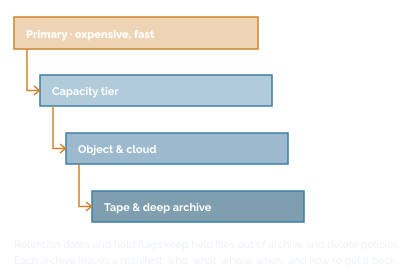
Starfish helps you initially classify and organize a file estate, then manage the full data lifecycle from file creation to deletion. Tags and TagSets enable file and project classification and organization according to inherited metadata elements, central IT taxonomy and user-generated file vocabulary. It archives on policy to lower-cost tiers (local disk, NFS, SMB, S3-compatible object, Azure Blob, GCS, tape) with versioning, compression, tarball packing, encryption, checksums, and IAM role support.
It provides scalable data protection for billions of files and restores them selectively. It detects ROT data continuously rather than in campaigns. It migrates any-to-any at high parallelism, with hash verification and ACL preservation across POSIX, SMB, and NFS. Retention dates and hold flags exclude held files from deletion and archive policies. Tag-pinning, recursive aggregates, and dynamic archive modelling in dashboards let stakeholders agree on criteria before anything moves. Specific lifecycle rights can be delegated to data owners through Zones.
“Our researchers will revolt if you touch their data.”
They should. That is why the sequence is archive first, delete later, with warnings before movement and the ability to recover afterwards. ASU freed 3 PB from scratch storage that way and reported very little pushback, because nothing was irreversible and the notifications went to PIs as well as users. Zones put the decision making in the hands of data owners.
Built from these use cases
One outcome, multiple capabilities
Storage Analytics
Turns weeks-long manual audits into on-demand reporting and gives IT a defensible basis for forecasts and budget requests.
Archive & Tiering
Automatically classify unstructured data by age, activity, and value, then move inactive or lower-value data off primary storage to more cost-effective tiers.
Capacity Reclamation & ROT Reduction
Redundant, obsolete, and trivial (ROT) data accumulates because nobody has a fast, safe way to find it, prove it is unused, and get authorization to remove it.
Data Movement & Migration
Platform refreshes, cloud adoption, consolidations, and M&A integrations routinely overrun because legacy copy tools cannot move billions of files fast enough.
Data Protection
Traditional backup relies on slow, metadata-heavy tree walks to determine what changed, which cannot complete inside a window once an environment reaches billions of files.
Data Classification & Metadata Management
Most files carry only basic filesystem metadata (name, size, timestamps) with no reliable way to know what is inside them, who should own them, or how sensitive they are.
PROOF
~3 PB
Freed from high-speed scratch storage using an “archive first, delete later” workflow, with no critical data loss.
Arizona State University, Research Technology Office
A 4 PB scratch file system repeatedly hitting 99% capacity and crashing
"Preserving sequencing data is important because experiments can be costly to repeat. A single one of the large sequencing experiments can cost $25,000. If we lose that data, then that's a big loss for us."
- April Williams Wehner, PhD, Core Director for Integrative Genomics and Bioinformatics,
Salk Institute for Biological Studies
Seeing is believing
Start with an aging and ROT report on one volume.
Agree to the archive criteria with the stakeholders before a byte moves.
Cost Reduced
$2 million
A university healthcare system tiered more than 2 PB to object storage over two years, avoiding $2 million in additional capacity purchases.
Risk Avoided
2.4+ billion files
Clemson backs up 2.4+ billion files and 3.5 PB across seven volumes inside a 24-hour window.
Time Saved
~2.5 PB
in under two weeks
A biomedical research institute’s complete lift and shift from one storage system to a new one.
Accountability
Nearly 1 PB
Deleted by Harvard FAS users within weeks of rollout, once they could see what their data cost.
What teams do instead
Your real alternatives, side by side
Everyone now claims continuous policy-based tiering beats a one-time project. The difference is what happens at the scale you actually run, and what shape your data is in afterwards.
Dig Deeper
Keep reading before you commit to anything

Case Study
Archive first, delete later: how ASU freed ~3 PB of scratch
A 4 PB file system that kept crashing at 99%, stabilized at 70% with a weekly three-phase workflow and almost no pushback.
7-min read

Blog
How Starfish Storage delivers daily wins in data management to the University of Utah’s Scientific Computing and Imaging Institute
The University of Utah’s Scientific Computing and Imaging Institute uses Starfish Storage every day to manage a massive research data set, resolve hidden data issues and migrate data without interrupting researchers.
5-min read
Glossary
Get everyone using the same words
Storage admins, data owners, and finance can all say “cold data” and mean three different things. The glossary pins each term to one plain definition.
Quick reference
FAQ
Frequently asked questions
We already have this from our storage vendor.
You have it for that vendor. The question is what happens to the files on your other platforms, and what happens when you replace this array. Vendor tools are the reason you cannot answer a question about your whole estate in one place, and they are the mechanism by which the next migration becomes a project or simply locks you in to that vendor.
We can’t afford the disruption of a data management project.
Then do not start one. Start with a read-only scan of one or two volumes, out of band, no agents in the data path, no change to how anyone works. Four to six weeks later you have an aging, ownership, and ROT report. Nothing has moved, and you decide whether there is a business case.
We have scripts that do this.
Most of our customers did too, and the scripts were fine until they were not. The failure mode is always the same: the person who wrote them leaves, or the file count crosses a line and they stop finishing. A biomedical institute we work with replaced a homegrown copy pipeline that had become unmaintainable; the Starfish sequence now completes in 30 minutes on average, with full reporting and history.
What happens to file access when data moves?
Recovery is available through the GUI, the CLI, and, for data owners, inside their own Zone, without a ticket. Where transparency to the user matters, a Starfish script generates soft links so the movement is invisible: Salk’s researchers noticed no difference.
How do we know a restore will actually work?
You verify rather than assume. Starfish validates file metadata before and after every job run and compares cryptographic checksums across source and destination; on cloud and object targets it enforces protocol-level header matching. Governance comes from role-based permission boundaries, metadata cataloging, policy-driven automation, and audit reporting.
Ready When You Are
It should not be a project you dread every three years.
It should happen quietly, continuously, on policy, in a way you can prove afterwards.